What is a FIT file?
FIT (Flexible and Interoperable Data Transfer) is the binary format used by Garmin and most sports devices to record rides, runs and workouts. It is compact but unreadable without a dedicated app or platform.
What you see with OmniFile Studio
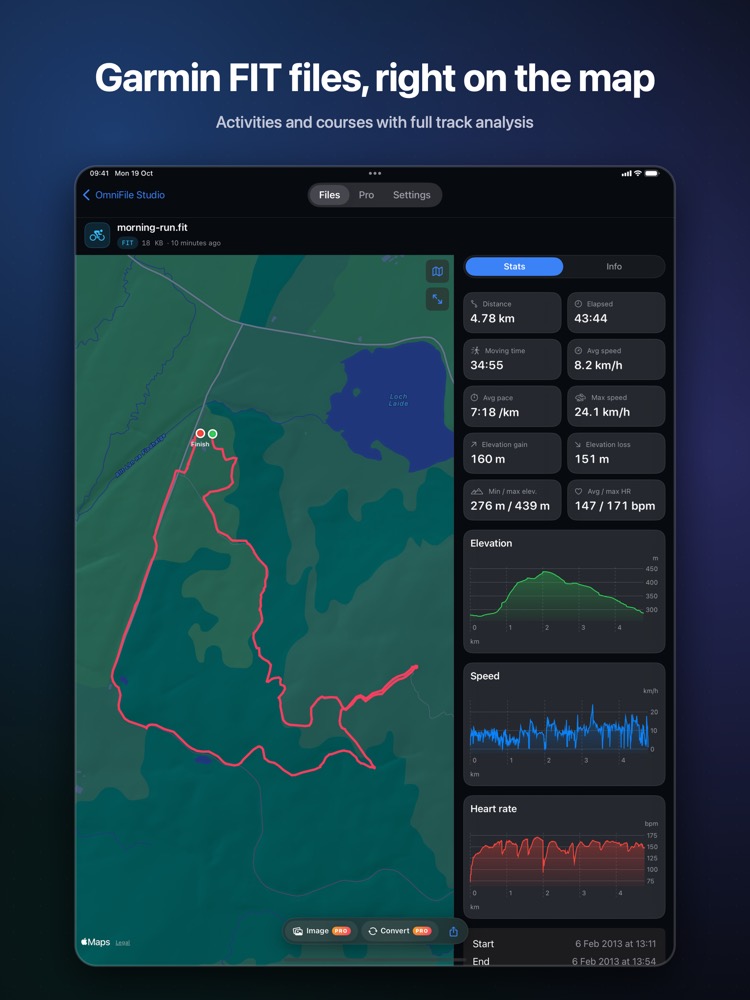
- check_circleActivities and courses on Apple Maps
- check_circleDistance, time, pace, speed, climb and descent
- check_circleHeart-rate, cadence and power from FIT data
- check_circleElevation and speed charts with splits
How to open FIT files on your iPhone & iPad
-
1
Install OmniFile Studio
Get it free from the App Store on your iPhone or iPad.
-
2
Open or share the file
Tap the file in Files, or use the share sheet in Mail, WhatsApp, Safari or AirDrop and pick Quick View or Open in OmniFile Studio.
-
3
Explore it
Your FIT file opens in a dedicated viewer, read entirely on your device.
lock Files are read on your device and never uploaded. No accounts, no analytics, no tracking.
Questions
How do I view a .fit file on iPhone?
Install OmniFile Studio and open the FIT file from Files or share it to the app from Mail, AirDrop or any other app.
Which devices are supported?
FIT files from Garmin, Wahoo, Coros, Zwift and other devices that write the standard FIT format.
Do I need a Garmin account?
No. The file is read directly on your device, with no account.